/* global React, ReactDOM, TweaksPanel, useTweaks, TweakSection, TweakColor, TweakRadio, TweakToggle, TweakSlider */
const { useState, useEffect, useRef, useMemo } = React;

/* =========================================================
   Tokens
   ========================================================= */
const TOKENS = {
  teal:  "#0EA5A4",
  tealDeep: "#0B7C7B",
  mint:  "#D4F1E8",
  mintSoft: "#E8F6F0",
  cream: "#FAF6EE",
  creamDeep: "#F2E9D7",
  coral: "#F4A89A",
  coralSoft: "#FDEAE3",
  ink:   "#1F3A3D",
  inkSoft: "#4F6669",
  line:  "rgba(31,58,61,0.08)",
};

/* =========================================================
   Reveal-on-scroll hook
   ========================================================= */
function useReveal() {
  const ref = useRef(null);
  const [shown, setShown] = useState(false);
  useEffect(() => {
    const el = ref.current;
    if (!el) return;
    const io = new IntersectionObserver(
      ([e]) => { if (e.isIntersecting) { setShown(true); io.disconnect(); } },
      { threshold: 0.18 }
    );
    io.observe(el);
    return () => io.disconnect();
  }, []);
  return [ref, shown];
}

function Reveal({ children, delay = 0, as: As = "div", className = "", style = {} }) {
  const [ref, shown] = useReveal();
  return (
    <As
      ref={ref}
      className={className}
      style={{
        ...style,
        opacity: shown ? 1 : 0,
        transform: shown ? "translateY(0)" : "translateY(18px)",
        transition: `opacity .8s ease ${delay}ms, transform .8s cubic-bezier(.2,.7,.2,1) ${delay}ms`,
      }}
    >
      {children}
    </As>
  );
}

/* =========================================================
   Email signup form (waitlist)
   ========================================================= */
function WaitlistForm({ variant = "hero", accent = TOKENS.teal }) {
  const [email, setEmail] = useState("");
  const [state, setState] = useState("idle"); // idle | loading | done | error
  const [msg, setMsg] = useState("");

  const onDark = variant === "cta";
  const noteColor = state === "error"
    ? (onDark ? "#FFB8A8" : "#C24A3A")
    : (onDark ? "rgba(255,255,255,0.78)" : TOKENS.inkSoft);

  const submit = async (e) => {
    e.preventDefault();
    const valid = /^[^\s@]+@[^\s@]+\.[^\s@]+$/.test(email.trim());
    if (!valid) {
      setState("error");
      setMsg("メールアドレスの形式をご確認ください");
      return;
    }
    setState("loading");
    setMsg("");
    try {
      const res = await fetch("https://formspree.io/f/xqejbazd", {
        method: "POST",
        headers: { "Content-Type": "application/json", "Accept": "application/json" },
        body: JSON.stringify({
          email: email.trim(),
          source: variant,
          page: "matomerun-lp",
          submitted_at: new Date().toISOString(),
        }),
      });
      if (res.ok) {
        setState("done");
        setMsg("ご登録ありがとうございました。先行案内をお送りします。");
      } else {
        const data = await res.json().catch(() => ({}));
        setState("error");
        setMsg(data?.error || "送信に失敗しました。時間をおいて再度お試しください。");
      }
    } catch (err) {
      setState("error");
      setMsg("通信エラーが発生しました。ネットワークをご確認ください。");
    }
  };

  const isDone = state === "done";

  return (
    <form onSubmit={submit} className="w-full" noValidate>
      <div
        className="flex flex-col sm:flex-row gap-2 p-1.5 rounded-2xl"
        style={{
          background: "#fff",
          border: `1px solid ${TOKENS.line}`,
          boxShadow: "0 10px 30px -18px rgba(15,42,45,0.25)",
        }}
      >
        <div className="flex-1 flex items-center gap-2 px-3">
          <svg width="18" height="18" viewBox="0 0 24 24" fill="none" stroke={TOKENS.inkSoft} strokeWidth="1.8" strokeLinecap="round" strokeLinejoin="round">
            <rect x="3" y="5" width="18" height="14" rx="2"/>
            <path d="m3 7 9 6 9-6"/>
          </svg>
          <input
            type="email"
            value={email}
            disabled={isDone}
            onChange={(e) => { setEmail(e.target.value); if (state === "error") setState("idle"); }}
            placeholder="メールアドレスを入力"
            className="w-full bg-transparent outline-none py-3 text-[15px] placeholder:text-[color:var(--muted)] disabled:opacity-60"
            style={{ color: TOKENS.ink }}
            aria-label="メールアドレス"
          />
        </div>
        <button
          type="submit"
          disabled={state === "loading" || isDone}
          className="btn-press relative overflow-hidden rounded-xl px-5 py-3 text-[15px] font-medium text-white transition-all disabled:opacity-80"
          style={{
            background: isDone ? TOKENS.tealDeep : accent,
            boxShadow: `0 8px 20px -10px ${accent}80`,
            minWidth: 180,
            ["--accent"]: accent,
          }}
        >
          {state === "loading"
            ? "登録中…"
            : isDone
            ? "✓ 登録完了"
            : variant === "hero"
            ? "ウェイティングリストに登録"
            : "先行案内を受け取る"}
        </button>
      </div>
      <div className="min-h-[22px] mt-2 px-1 text-[13px]" style={{ color: noteColor }}>
        {msg ||
          (variant === "hero"
            ? "ベータ版を若干名募集中です。先着順でご案内します。"
            : "登録は無料・1分で完了します。配信解除はいつでも可能。")}
      </div>
    </form>
  );
}

/* =========================================================
   Phone frame for synthetic mockup (matches screenshot bezel)
   ========================================================= */
function PhoneFrame({ children, style = {} }) {
  return (
    <div
      style={{
        width: 260,
        height: 540,
        borderRadius: 38,
        padding: 7,
        background: "linear-gradient(180deg,#E9E5DE 0%, #D7D2C8 100%)",
        boxShadow:
          "inset 0 0 0 1px rgba(255,255,255,0.6), 0 30px 60px -30px rgba(15,42,45,0.35), 0 8px 20px -10px rgba(15,42,45,0.18)",
        ...style,
      }}
    >
      <div
        style={{
          width: "100%",
          height: "100%",
          borderRadius: 32,
          background: TOKENS.cream,
          overflow: "hidden",
          position: "relative",
        }}
      >
        {children}
      </div>
    </div>
  );
}

/* Synthetic "write summary" mockup */
function WriteSummaryMock() {
  return (
    <PhoneFrame>
      {/* status bar */}
      <div className="flex justify-between items-center px-5 pt-3 text-[11px]" style={{ color: TOKENS.ink }}>
        <span style={{ fontWeight: 600 }}>9:41</span>
        <div className="flex gap-1 items-center">
          <span style={{fontSize:10}}>●●●●</span>
        </div>
      </div>
      {/* header */}
      <div className="px-5 pt-3 pb-2 flex items-center justify-between">
        <svg width="18" height="18" viewBox="0 0 24 24" fill="none" stroke={TOKENS.ink} strokeWidth="2" strokeLinecap="round" strokeLinejoin="round"><path d="m15 18-6-6 6-6"/></svg>
        <div className="text-[14px] font-bold" style={{color:TOKENS.ink}}>要約を書く</div>
        <div className="text-[12px] font-medium" style={{color:TOKENS.teal}}>下書き</div>
      </div>

      {/* article hint card */}
      <div className="mx-4 mt-2 rounded-2xl p-3" style={{background:TOKENS.mintSoft}}>
        <div className="text-[10px] font-bold mb-1" style={{color:TOKENS.tealDeep}}>もとの記事</div>
        <div className="text-[10.5px] leading-[1.6]" style={{color:TOKENS.inkSoft}}>
          クジラたちは「歌」と呼ばれる音を出して仲間とコミュニケーションを…
        </div>
      </div>

      {/* mode toggles */}
      <div className="mx-4 mt-3 flex gap-1.5 p-1 rounded-xl" style={{background:"#fff", border:`1px solid ${TOKENS.line}`}}>
        <div className="flex-1 text-center py-1.5 text-[11px] font-medium rounded-lg" style={{background:TOKENS.teal, color:"#fff"}}>テキスト</div>
        <div className="flex-1 text-center py-1.5 text-[11px] font-medium rounded-lg" style={{color:TOKENS.inkSoft}}>手書き撮影</div>
      </div>

      {/* char limit */}
      <div className="mx-4 mt-3 flex gap-1.5">
        <span className="text-[10px] px-2 py-1 rounded-full" style={{background:"#fff", color:TOKENS.inkSoft, border:`1px solid ${TOKENS.line}`}}>40字</span>
        <span className="text-[10px] px-2 py-1 rounded-full font-medium" style={{background:TOKENS.cream, color:TOKENS.ink, border:`1px solid ${TOKENS.creamDeep}`}}>80字</span>
        <span className="text-[10px] px-2 py-1 rounded-full" style={{background:"#fff", color:TOKENS.inkSoft, border:`1px solid ${TOKENS.line}`}}>120字</span>
      </div>

      {/* writing area */}
      <div className="mx-4 mt-3 rounded-2xl p-3 h-[150px] relative" style={{background:"#fff", border:`1px solid ${TOKENS.line}`}}>
        <div className="text-[11px] leading-[1.75]" style={{color:TOKENS.ink}}>
          クジラの歌は仲間と話すためだけ<br/>でなく、海の生き物を守る大切な<br/>役割もあると分かってきた<span className="inline-block w-[1.5px] h-[12px] align-middle ml-[1px] animate-pulse" style={{background:TOKENS.teal}}></span>
        </div>
        <div className="absolute bottom-2 right-3 text-[10px] font-medium" style={{color:TOKENS.teal}}>54 / 80字</div>
      </div>

      {/* submit */}
      <div className="absolute bottom-5 left-4 right-4">
        <div className="rounded-2xl py-3 text-center text-[13px] font-bold text-white" style={{background:TOKENS.teal, boxShadow:`0 10px 20px -10px ${TOKENS.teal}99`}}>
          採点する
        </div>
      </div>
    </PhoneFrame>
  );
}

/* =========================================================
   Top navigation
   ========================================================= */
function Nav() {
  const [scrolled, setScrolled] = useState(false);
  useEffect(() => {
    const onScroll = () => setScrolled(window.scrollY > 12);
    window.addEventListener("scroll", onScroll, { passive: true });
    return () => window.removeEventListener("scroll", onScroll);
  }, []);
  return (
    <nav
      className="fixed top-0 inset-x-0 z-40 transition-all"
      style={{
        backdropFilter: "blur(14px)",
        background: scrolled ? "rgba(250,246,238,0.88)" : "rgba(250,246,238,0)",
        borderBottom: scrolled ? `1px solid ${TOKENS.line}` : "1px solid transparent",
      }}
    >
      <div className="mx-auto max-w-6xl px-6 h-16 flex items-center justify-between">
        <a href="#top" className="flex items-center">
          <img src="assets/logo.webp" alt="まとめるん — 読む・まとめる・伝わる、が伸びていく" className="h-10 md:h-11 w-auto object-contain"/>
        </a>
        <div className="flex items-center gap-7 text-[14px]" style={{color:TOKENS.inkSoft}}>
          <a href="#problem" className="hidden md:inline link-u">悩み</a>
          <a href="#how" className="hidden md:inline link-u">使い方</a>
          <a href="#feedback" className="hidden md:inline link-u">AI添削</a>
          <a href="#cta" className="hidden md:inline link-u">登録</a>
          <a href="#cta" className="btn-lift rounded-full px-4 py-2 text-[13px] font-medium text-white" style={{background:TOKENS.ink}}>
            先行登録
          </a>
        </div>
      </div>
    </nav>
  );
}

/* =========================================================
   Hero
   ========================================================= */
function Hero({ accent }) {
  return (
    <section id="top" className="relative pt-28 pb-16 md:pt-32 md:pb-24 overflow-hidden">
      {/* soft gradient blobs */}
      <div aria-hidden className="absolute inset-0 pointer-events-none">
        <div className="absolute -top-32 -left-32 w-[520px] h-[520px] rounded-full" style={{background:`radial-gradient(closest-side, ${TOKENS.mint}, transparent 70%)`, opacity:.9}}/>
        <div className="absolute top-20 -right-40 w-[560px] h-[560px] rounded-full" style={{background:`radial-gradient(closest-side, ${TOKENS.coralSoft}, transparent 70%)`, opacity:.8}}/>
        <div className="absolute bottom-0 left-1/3 w-[420px] h-[420px] rounded-full" style={{background:`radial-gradient(closest-side, ${TOKENS.creamDeep}, transparent 70%)`, opacity:.6}}/>
      </div>

      <div className="relative mx-auto max-w-6xl px-6 grid lg:grid-cols-[1.05fr_1fr] gap-12 lg:gap-10 items-center">
        {/* Left */}
        <div>
          <Reveal>
            <h1
              className="mt-5 font-bold leading-[1.15] tracking-tight"
              style={{
                fontFamily: "'Zen Kaku Gothic New', 'Noto Sans JP', sans-serif",
                color: TOKENS.ink,
                fontSize: "clamp(36px, 5.4vw, 60px)",
              }}
            >
              読む力は、<br/>
              <span style={{color: accent, textWrap:"balance"}}>一生の武器</span>になる。
            </h1>
          </Reveal>

          <Reveal delay={160}>
            <p className="mt-5 text-[16px] md:text-[17px] leading-[1.9] max-w-[520px]" style={{color:TOKENS.inkSoft, textWrap:"pretty"}}>
              ニュースを読み、自分の言葉でまとめる。<br/>
              AIが先生のようにやさしくフィードバックして、小学生から大人まで、読解力と表現力を育てます。
            </p>
          </Reveal>

          <Reveal delay={240}>
            <div className="mt-7 max-w-[520px]">
              <WaitlistForm variant="hero" accent={accent} />
            </div>
          </Reveal>

          <Reveal delay={320}>
            <div className="mt-6 flex flex-wrap items-center gap-x-6 gap-y-3 text-[13px]" style={{color:TOKENS.inkSoft}}>
              <div className="flex items-center gap-2"><Check c={accent}/>中学受験・適性検査対策</div>
              <div className="flex items-center gap-2"><Check c={accent}/>1日5分から</div>
              <div className="flex items-center gap-2"><Check c={accent}/>手書きOK</div>
            </div>
          </Reveal>
        </div>

        {/* Right: phone collage */}
        <div className="relative h-[420px] sm:h-[520px] md:h-[620px]">
          <PhoneCollage />
          <div className="absolute bottom-2 left-0 right-0 text-center text-[11.5px]" style={{color:TOKENS.inkSoft, letterSpacing:"0.02em"}}>
            ※ 画面は開発途中のイメージです。変更となる場合があります。
          </div>
        </div>
      </div>
    </section>
  );
}

function Check({ c }) {
  return (
    <span className="w-4 h-4 rounded-full inline-flex items-center justify-center" style={{background: c + "22"}}>
      <svg width="10" height="10" viewBox="0 0 24 24" fill="none" stroke={c} strokeWidth="3" strokeLinecap="round" strokeLinejoin="round"><path d="M20 6 9 17l-5-5"/></svg>
    </span>
  );
}

function PhoneCollage() {
  return (
    <div className="absolute inset-0 flex items-center justify-center">
      <div className="relative w-full h-full">
        {/* Main phone — 記事を読む */}
        <FloatPhone
          img="assets/screen-read.webp"
          style={{ left: "10%", top: "4%", rotate: "-3deg", z: 2, delay: 0, scale: 1.0 }}
          label="記事を読む"
        />
        {/* Secondary phone — AIフィードバック */}
        <FloatPhone
          img="assets/screen-feedback.webp"
          style={{ right: "4%", top: "22%", rotate: "5deg", z: 3, delay: 1.0, scale: 0.88 }}
          label="AIフィードバック"
        />
      </div>
    </div>
  );
}

function FloatPhone({ img, synthetic, style, label, featured }) {
  const { left, right, top, rotate = "0deg", z = 1, delay = 0, scale = 0.92 } = style || {};
  return (
    <div
      className="absolute"
      style={{
        left, right, top,
        zIndex: z,
        transform: `rotate(${rotate}) scale(${scale})`,
      }}
    >
      <div className="relative">
        {synthetic ? (
          synthetic
        ) : (
          <img
            src={img}
            alt={label}
            style={{
              width: "min(260px, 44vw)",
              height: "auto",
              filter: "drop-shadow(0 30px 50px rgba(15,42,45,0.28)) drop-shadow(0 6px 12px rgba(15,42,45,0.12))",
            }}
          />
        )}
        {featured && (
          <div className="absolute -top-3 left-1/2 -translate-x-1/2 px-2.5 py-1 rounded-full text-[10px] font-bold text-white whitespace-nowrap" style={{background:TOKENS.coral, boxShadow:"0 8px 16px -8px rgba(244,168,154,0.8)"}}>
            ✏️ {label}
          </div>
        )}
      </div>
    </div>
  );
}

/* =========================================================
   Problem section
   ========================================================= */
function ProblemSection() {
  const stroke = (props) => ({ width: 26, height: 26, viewBox: "0 0 24 24", fill: "none", stroke: TOKENS.tealDeep, strokeWidth: 1.7, strokeLinecap: "round", strokeLinejoin: "round", ...props });
  const items = [
    {
      icon: (
        <svg {...stroke()}>
          <path d="M12 20h9"/>
          <path d="M16.5 3.5a2.121 2.121 0 0 1 3 3L7 19l-4 1 1-4 12.5-12.5z"/>
        </svg>
      ),
      title: "要約の丸付けが難しい",
      body: "「合っているのか分からない」毎回の添削で親も子も疲れてしまう。",
    },
    {
      icon: (
        <svg {...stroke()}>
          <path d="M21 15a2 2 0 0 1-2 2H7l-4 4V5a2 2 0 0 1 2-2h14a2 2 0 0 1 2 2z"/>
          <path d="M8 10h.01M12 10h.01M16 10h.01"/>
        </svg>
      ),
      title: "記述の添削ができない",
      body: "塾でも記述問題は点数だけ。具体的なアドバイスが届きにくい。",
    },
    {
      icon: (
        <svg {...stroke()}>
          <path d="M4 19.5A2.5 2.5 0 0 1 6.5 17H20"/>
          <path d="M6.5 2H20v20H6.5A2.5 2.5 0 0 1 4 19.5v-15A2.5 2.5 0 0 1 6.5 2z"/>
        </svg>
      ),
      title: "なんとなく読んでいる",
      body: "読めているつもりでも、要点がつかめているかは見えにくい。",
    },
    {
      icon: (
        <svg {...stroke()}>
          <rect x="3" y="4" width="18" height="18" rx="2"/>
          <path d="M16 2v4M8 2v4M3 10h18"/>
          <path d="m9 16 2 2 4-4"/>
        </svg>
      ),
      title: "毎日少しずつ続けたい",
      body: "短時間で習慣化できる、ちょうどよい教材がなかなか無い。",
    },
  ];
  return (
    <section id="problem" className="py-24 md:py-28 relative">
      <div className="mx-auto max-w-6xl px-6">
        <Reveal>
          <div className="text-center max-w-2xl mx-auto">
            <div className="inline-block text-[12.5px] font-bold tracking-[0.18em] uppercase" style={{color:TOKENS.coral}}>Problem</div>
            <h2 className="mt-3 text-[28px] md:text-[36px] font-bold leading-[1.3]" style={{color:TOKENS.ink, fontFamily:"'Zen Kaku Gothic New', 'Noto Sans JP', sans-serif"}}>
              こんな悩みは、ありませんか？
            </h2>
          </div>
        </Reveal>

        <div className="mt-12 md:mt-14 grid grid-cols-1 md:grid-cols-2 gap-4 md:gap-5">
          {items.map((it, i) => (
            <Reveal key={i} delay={i*80}>
              <div
                className="group rounded-3xl p-7 md:p-8 h-full transition-all hover:-translate-y-1"
                style={{
                  background: "#fff",
                  border: `1px solid ${TOKENS.line}`,
                  boxShadow: "0 1px 0 rgba(255,255,255,0.6) inset, 0 20px 40px -28px rgba(15,42,45,0.18)",
                }}
              >
                <div className="flex items-start gap-5">
                  <div className="text-[28px] w-14 h-14 rounded-2xl flex items-center justify-center shrink-0" style={{background: i%2 ? TOKENS.mintSoft : TOKENS.coralSoft}}>
                    {it.icon}
                  </div>
                  <div>
                    <div className="text-[18px] font-bold leading-[1.5]" style={{color:TOKENS.ink}}>{it.title}</div>
                    <div className="mt-2 text-[14.5px] leading-[1.85]" style={{color:TOKENS.inkSoft}}>{it.body}</div>
                  </div>
                </div>
              </div>
            </Reveal>
          ))}
        </div>
      </div>
    </section>
  );
}

/* =========================================================
   How it works (3 steps)
   ========================================================= */
function HowSection({ accent }) {
  const steps = [
    {
      n: "01",
      title: "記事を読む",
      body: "科学・環境・社会・AI・文化など、考える力が育つ短い記事を毎日お届け。",
      tone: TOKENS.mintSoft,
      img: "assets/screen-read.webp",
    },
    {
      n: "02",
      title: "要約を書く",
      body: "テキスト入力か、手書きをカメラで撮影。40・80・120字から挑戦できます。",
      tone: TOKENS.cream,
      img: "assets/screen-write.webp",
    },
    {
      n: "03",
      title: "AIからフィードバック",
      body: "点数だけでなく、良かった点・改善点を先生のようにやさしく伝えます。",
      tone: TOKENS.coralSoft,
      img: "assets/screen-feedback.webp",
    },
  ];

  return (
    <section id="how" className="py-24 md:py-28 relative" style={{background:`linear-gradient(180deg, transparent 0%, ${TOKENS.mintSoft} 40%, ${TOKENS.mintSoft} 60%, transparent 100%)`}}>
      <div className="mx-auto max-w-6xl px-6">
        <Reveal>
          <div className="text-center max-w-2xl mx-auto">
            <div className="inline-block text-[12.5px] font-bold tracking-[0.18em] uppercase" style={{color:accent}}>How it works</div>
            <h2 className="mt-3 text-[28px] md:text-[36px] font-bold leading-[1.3]" style={{color:TOKENS.ink, fontFamily:"'Zen Kaku Gothic New', 'Noto Sans JP', sans-serif"}}>
              使い方は、たった3ステップ
            </h2>
            <p className="mt-4 text-[15px] leading-[1.9]" style={{color:TOKENS.inkSoft}}>
              1日5分から。読む→書く→添削まで、迷わず続けられます。
            </p>
          </div>
        </Reveal>

        <div className="mt-14 grid grid-cols-1 md:grid-cols-3 gap-6 md:gap-7">
          {steps.map((s, i) => (
            <Reveal key={i} delay={i*120}>
              <div
                className="rounded-[28px] p-7 h-full flex flex-col"
                style={{
                  background: "#fff",
                  border: `1px solid ${TOKENS.line}`,
                  boxShadow: "0 30px 60px -40px rgba(15,42,45,0.25)",
                }}
              >
                <div className="flex items-center gap-3">
                  <div className="font-bold text-[14px] tracking-[0.1em]" style={{color:accent}}>STEP {s.n}</div>
                  <div className="h-px flex-1" style={{background:TOKENS.line}}/>
                </div>
                <div className="mt-3 text-[22px] font-bold" style={{color:TOKENS.ink, fontFamily:"'Zen Kaku Gothic New', 'Noto Sans JP', sans-serif"}}>{s.title}</div>
                <div className="mt-2 text-[14px] leading-[1.85]" style={{color:TOKENS.inkSoft}}>{s.body}</div>

                <div className="mt-6 rounded-2xl flex items-center justify-center pt-6 pb-2 flex-1" style={{background:s.tone, minHeight:300}}>
                  <img src={s.img} alt={s.title} style={{ width: 200, height:"auto", filter:"drop-shadow(0 20px 30px rgba(15,42,45,0.18))" }} />
                </div>
              </div>
            </Reveal>
          ))}
        </div>
      </div>
    </section>
  );
}

/* =========================================================
   AI Feedback section
   ========================================================= */
function FeedbackSection({ accent }) {
  const [tab, setTab] = useState(0);
  const tabs = [
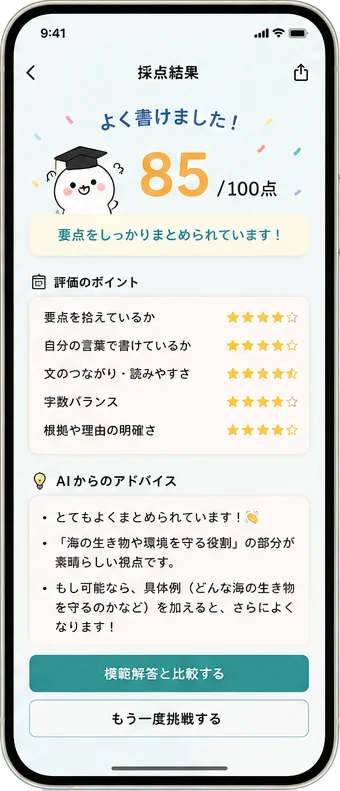
    {label:"褒める",   body:"重要なポイントをしっかり整理できています。「クジラの歌が海の生態系を守る」という核を外さずに書けていますね。"},
    {label:"気づき",   body:"理由をもう少し加えると説得力が増します。例えば「なぜ守る役割があるのか」を一文添えてみましょう。"},
    {label:"次の一歩", body:"結論を先に書くと読みやすくなります。次回は「最も伝えたいこと」を冒頭に置く構成を試してみてください。"},
    {label:"言い換え", body:"同じ表現が続いています。「大切」「重要」「役立つ」など、言い換えのバリエーションを増やしましょう。"},
  ];

  return (
    <section id="feedback" className="py-24 md:py-28 relative">
      <div className="mx-auto max-w-6xl px-6 grid lg:grid-cols-[1fr_1.1fr] gap-14 items-center">
        {/* Left copy */}
        <div className="order-2 lg:order-1">
          <Reveal>
            <div className="inline-block text-[12.5px] font-bold tracking-[0.18em] uppercase" style={{color:TOKENS.coral}}>AI feedback</div>
            <h2 className="mt-3 text-[28px] md:text-[38px] font-bold leading-[1.25]" style={{color:TOKENS.ink, fontFamily:"'Zen Kaku Gothic New', 'Noto Sans JP', sans-serif"}}>
              AIが、先生のように<br/>やさしく添削します。
            </h2>
            <p className="mt-5 text-[15.5px] leading-[1.95]" style={{color:TOKENS.inkSoft, textWrap:"pretty"}}>
              冷たい減点方式ではなく、褒めながら伸ばす。<br/>
              スコア・良かった点・改善ポイント・次に意識することを、わかりやすい言葉で届けます。
            </p>
          </Reveal>

          <Reveal delay={120}>
            <div className="mt-7 flex flex-wrap gap-2">
              {tabs.map((t, i) => (
                <button
                  key={i}
                  onClick={() => setTab(i)}
                  className="btn-lift rounded-full px-4 py-2 text-[13.5px] font-medium"
                  style={{
                    background: tab === i ? TOKENS.ink : "#fff",
                    color: tab === i ? "#fff" : TOKENS.ink,
                    border: `1px solid ${tab === i ? TOKENS.ink : TOKENS.line}`,
                  }}
                >
                  {t.label}
                </button>
              ))}
            </div>
          </Reveal>

          <Reveal delay={200}>
            <div
              key={tab}
              className="mt-5 rounded-2xl p-5 text-[14.5px] leading-[1.95]"
              style={{
                background: TOKENS.mintSoft,
                color: TOKENS.ink,
                border: `1px solid ${TOKENS.line}`,
                animation: "fadeUp .4s ease",
              }}
            >
              <div className="flex items-start gap-3">
                <div className="w-7 h-7 rounded-full flex items-center justify-center shrink-0" style={{background:accent, color:"#fff", fontWeight:700, fontSize:12}}>AI</div>
                <div style={{textWrap:"pretty"}}>{tabs[tab].body}</div>
              </div>
            </div>
          </Reveal>
        </div>

        {/* Right phone */}
        <Reveal delay={160} className="order-1 lg:order-2">
          <div className="relative flex justify-center">
            <div aria-hidden className="absolute -inset-6 rounded-[48px]" style={{background:`radial-gradient(closest-side, ${TOKENS.coralSoft}, transparent 70%)`, opacity:.9}}/>
            <img
              src="assets/screen-feedback.webp"
              alt="AIフィードバック画面"
              style={{
                position:"relative",
                width: 320,
                height: "auto",
                filter: "drop-shadow(0 30px 60px rgba(15,42,45,0.28))",
              }}
            />
            {/* annotation chips */}
            <Chip style={{top:"6%", right:"6%"}} color={accent} icon={
              <svg width="13" height="13" viewBox="0 0 24 24" fill="none" stroke={accent} strokeWidth="2.8" strokeLinecap="round" strokeLinejoin="round"><path d="M20 6 9 17l-5-5"/></svg>
            }>85点 / 100点</Chip>
            <Chip style={{top:"42%", left:"-6%"}} color={TOKENS.coral} icon={
              <svg width="13" height="13" viewBox="0 0 24 24" fill="none" stroke={TOKENS.coral} strokeWidth="1.9" strokeLinecap="round" strokeLinejoin="round"><path d="m12 2 3.09 6.26L22 9.27l-5 4.87 1.18 6.88L12 17.77l-6.18 3.25L7 14.14 2 9.27l6.91-1.01L12 2z"/></svg>
            }>評価のポイント 5項目</Chip>
            <Chip style={{bottom:"14%", right:"-4%"}} color={TOKENS.tealDeep} icon={
              <svg width="13" height="13" viewBox="0 0 24 24" fill="none" stroke={TOKENS.tealDeep} strokeWidth="1.9" strokeLinecap="round" strokeLinejoin="round"><path d="M9 18h6"/><path d="M10 22h4"/><path d="M12 2a7 7 0 0 0-4 12.7c.6.5 1 1.2 1 2v.3h6V17c0-.8.4-1.5 1-2A7 7 0 0 0 12 2z"/></svg>
            }>次に意識すること</Chip>
          </div>
        </Reveal>
      </div>
    </section>
  );
}

function Chip({ children, style, color, icon }) {
  return (
    <div
      className="absolute rounded-full px-3.5 py-2 text-[12px] font-bold whitespace-nowrap inline-flex items-center gap-1.5"
      style={{
        ...style,
        background: "#fff",
        color,
        border: `1px solid ${TOKENS.line}`,
        boxShadow: "0 12px 24px -14px rgba(15,42,45,0.25)",
      }}
    >
      {icon && <span className="inline-flex" style={{flexShrink:0}}>{icon}</span>}
      <span>{children}</span>
    </div>
  );
}

/* =========================================================
   Growth / record teaser (uses progress screenshot)
   ========================================================= */
function GrowthSection({ accent }) {
  return (
    <section className="py-24 md:py-28" style={{background: TOKENS.cream}}>
      <div className="mx-auto max-w-6xl px-6 grid lg:grid-cols-[1.05fr_1fr] gap-12 items-center">
        <Reveal>
          <div className="relative flex justify-center lg:justify-center lg:pl-16">
            <div aria-hidden className="absolute -inset-6 rounded-[48px]" style={{background:`radial-gradient(closest-side, ${TOKENS.mint}, transparent 70%)`}}/>
            <img
              src="assets/screen-progress.webp"
              alt="学習の記録"
              style={{
                position:"relative",
                width: 300,
                height: "auto",
                filter: "drop-shadow(0 30px 60px rgba(15,42,45,0.28))",
              }}
            />
          </div>
        </Reveal>

        <div>
          <Reveal delay={100}>
            <div className="inline-block text-[12.5px] font-bold tracking-[0.18em] uppercase" style={{color:accent}}>Growth</div>
            <h2 className="mt-3 text-[28px] md:text-[36px] font-bold leading-[1.25]" style={{color:TOKENS.ink, fontFamily:"'Zen Kaku Gothic New', 'Noto Sans JP', sans-serif"}}>
              「読めている」を、<br/>見える形にする。
            </h2>
            <p className="mt-4 text-[15.5px] leading-[1.95]" style={{color:TOKENS.inkSoft, textWrap:"pretty"}}>
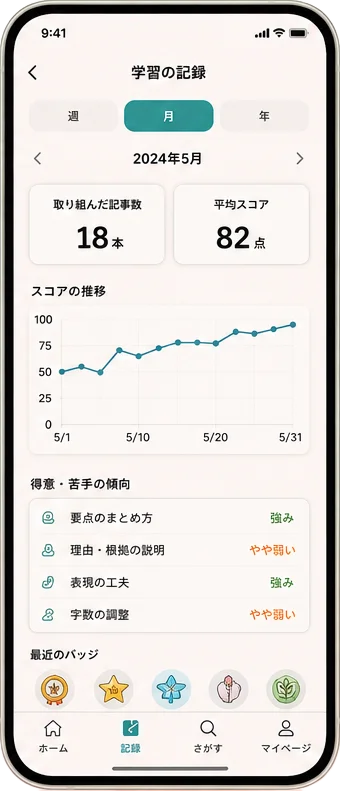
              要約力、語彙力、論理性、継続日数。やわらかいUIで成長を可視化。
              親子で進捗を共有でき、毎日少しずつ続けたくなります。
            </p>
          </Reveal>

          <Reveal delay={180}>
            <div className="mt-7 grid grid-cols-2 gap-3">
              {[
                {k:"要点のまとめ方", v:"強み", tone: accent},
                {k:"理由・根拠の説明", v:"やや弱い", tone: TOKENS.coral},
                {k:"表現の工夫", v:"強み", tone: accent},
                {k:"字数の調整", v:"やや弱い", tone: TOKENS.coral},
              ].map((s,i)=>(
                <div key={i} className="rounded-2xl px-4 py-3 flex items-center justify-between" style={{background:"#fff", border:`1px solid ${TOKENS.line}`}}>
                  <span className="text-[13.5px] font-medium" style={{color:TOKENS.ink}}>{s.k}</span>
                  <span className="text-[12.5px] font-bold" style={{color:s.tone}}>{s.v}</span>
                </div>
              ))}
            </div>
          </Reveal>
        </div>
      </div>
    </section>
  );
}

/* =========================================================
   Final CTA
   ========================================================= */
function CTASection({ accent }) {
  return (
    <section id="cta" className="py-24 md:py-28">
      <div className="mx-auto max-w-4xl px-6">
        <div
          className="relative rounded-[36px] p-8 md:p-14 overflow-hidden"
          style={{
            background:`linear-gradient(160deg, ${TOKENS.ink} 0%, #2D5557 100%)`,
            boxShadow:"0 40px 80px -40px rgba(15,42,45,0.5)",
          }}
        >
          {/* decorative */}
          <div aria-hidden className="absolute -top-24 -right-24 w-[360px] h-[360px] rounded-full" style={{background:`radial-gradient(closest-side, ${accent}44, transparent 70%)`}}/>
          <div aria-hidden className="absolute -bottom-24 -left-24 w-[320px] h-[320px] rounded-full" style={{background:`radial-gradient(closest-side, ${TOKENS.coral}33, transparent 70%)`}}/>

          <Reveal>
            <div className="relative">
              <div className="inline-flex items-center gap-2 rounded-full px-3 py-1.5 text-[12px] font-medium" style={{background:"rgba(255,255,255,0.12)", color:"#fff", border:"1px solid rgba(255,255,255,0.18)"}}>
                <span className="w-1.5 h-1.5 rounded-full" style={{background:TOKENS.coral}}/>
                ベータ版・若干名募集
              </div>
              <h2 className="mt-5 text-[26px] md:text-[36px] font-bold leading-[1.3] text-white" style={{fontFamily:"'Zen Kaku Gothic New', 'Noto Sans JP', sans-serif"}}>
                一緒に試してくれる方を、<br/>募集しています。
              </h2>
              <p className="mt-5 text-[15px] md:text-[16px] leading-[1.95] max-w-[560px]" style={{color:"rgba(255,255,255,0.78)", textWrap:"pretty"}}>
                中学受験・読解力トレーニング向けのAI要約アプリを開発予定です。<br/>
                先行案内を受け取りたい方は、メールアドレスをご登録ください。
              </p>

              <div className="mt-7 max-w-[560px]">
                <WaitlistForm variant="cta" accent={accent} />
              </div>
            </div>
          </Reveal>
        </div>
      </div>
    </section>
  );
}

/* =========================================================
   Footer
   ========================================================= */
function Footer() {
  return (
    <footer className="py-10 border-t" style={{borderColor:TOKENS.line}}>
      <div className="mx-auto max-w-6xl px-6 flex flex-col gap-6">
        <div className="text-[12px] leading-[1.8] text-center md:text-left" style={{color:TOKENS.inkSoft}}>
          ※ 本ページに掲載しているアプリ画面はすべて開発途中のイメージです。実際のリリース版とは仕様・デザインが異なる場合があります。
        </div>
        <div className="flex flex-col md:flex-row gap-4 items-center justify-between">
          <div className="flex items-center gap-3">
            <img src="assets/logo.webp" alt="まとめるん" className="h-10 w-auto object-contain"/>
            <span className="text-[12px]" style={{color:TOKENS.inkSoft}}>© 2026</span>
          </div>
          <div className="flex gap-6 text-[12.5px]" style={{color:TOKENS.inkSoft}}>
            <a href="#" className="hover:opacity-70">プライバシー</a>
            <a href="#" className="hover:opacity-70">特定商取引法</a>
            <a href="mailto:hello@matomerun.app" className="hover:opacity-70">お問い合わせ</a>
          </div>
        </div>
      </div>
    </footer>
  );
}

/* =========================================================
   Root
   ========================================================= */
const TWEAK_DEFAULTS = /*EDITMODE-BEGIN*/{
  "accent": "#0EA5A4",
  "headline": "読む力は、一生の武器になる。",
  "density": "comfortable",
  "showBetaBadge": true
}/*EDITMODE-END*/;

function App() {
  const [tweaks, setTweak] = useTweaks(TWEAK_DEFAULTS);

  // inject CSS vars
  useEffect(() => {
    const root = document.documentElement;
    root.style.setProperty("--ink", TOKENS.ink);
    root.style.setProperty("--muted", TOKENS.inkSoft);
    root.style.setProperty("--accent", tweaks.accent);
  }, [tweaks.accent]);

  return (
    <div style={{
      background: TOKENS.cream,
      color: TOKENS.ink,
      fontFamily: "'Noto Sans JP', system-ui, -apple-system, sans-serif",
      WebkitFontSmoothing: "antialiased",
    }}>
      <Nav/>
      <Hero accent={tweaks.accent}/>
      <ProblemSection/>
      <HowSection accent={tweaks.accent}/>
      <FeedbackSection accent={tweaks.accent}/>
      <GrowthSection accent={tweaks.accent}/>
      <CTASection accent={tweaks.accent}/>
      <Footer/>

      <TweaksPanel title="Tweaks" defaultOpen={false}>
        <TweakSection title="アクセントカラー">
          <TweakColor
            label="メインカラー"
            value={tweaks.accent}
            onChange={(v)=>setTweak("accent", v)}
            options={["#0EA5A4", "#34A29E", "#5BA679", "#E89B7E", "#3A6FB5"]}
          />
        </TweakSection>
      </TweaksPanel>
    </div>
  );
}

ReactDOM.createRoot(document.getElementById("root")).render(<App/>);